*** ImageStorage2 ***
(c) 2021-2026 CsAB :: v2.0ß (build: 2025-06-30) ==============================================================================1. Introducing
This document describes all the available API calls for ImageStorage2 when creating, updating, finding and converting images. For documentation on serving raw and transformed images once uploaded into your ImageStorage2 hosted storage.2. Base URL
https://is2.webhirdet.hu/ This is the base URL used for all API requests described in this document. It consists of: * SCHEME: https * HOST: is2.webhirdet.hu3. Authentication
You may choose any of the following methods to authenticate with the ImageStorage2:3.1. Query string
Set the key query parameter in your API requests: {SCHEME}://{HOST}/im/YOUR_API_KEY/... This is the default authentication method.3.2. Account
Account and YOUR_API_KEY created by System Adminitrators (in XML format): The YOUR_API_KEY length 32 alphanumeric characters. Example:<settings>
<key>01234567890123456789012345fedcab</key>
<user>is2.webhirdet.hu</user>
<domain_filter note="can only be used for images belonging to these domains">
<domain>mucius.hu</domain>
<domain>www.mucius.hu</domain>
</domain_filter>
<drop_source note="yes or no. if yes remove original source after conversion">yes</drop_source>
<formats note="unique formats">
<format>clip_80x80_webp</format>
<format>crop_80x80_webp</format>
<format>scale_80x80_webp</format>
<format>max_200x200_avif</format>
<format>max_200x200_gif</format>
<format>max_200x200_png</format>
<format>max_200x200_jpg</format>
</formats>
<auth_key note="private key for remove">123456-1234567-1234567-12345-1234567</auth_key>
</settings>
4. Images
The following section describes how to create, update, search and convert images in your ImageStorage2 account.4.1. Create (from URL)
Saves an image into your ImageStorage2 online hosted storage using a source image which is publicly accessible via an HTTP or HTTPS URL. +-------------------------------------------------------------------+ | WARNING! In some cases, you can use only the parameters that were | | previously enabled in your ACCOUNT XML file. | +-------------------------------------------------------------------+4.1.1. Query String Parameters
============================================================================== Parameter :: Type :: Required :: Description ============================================================================== api_key :: string :: true :: Your "public" API key format :: string :: true :: Unique image conversion formats including fit, size and filetype (separated by underscore [_] characters, eg. scale_640x480_webp = {fit}_{size}_{filetype}) url :: string :: true :: Publicly accessible URL of the source image you would like to copy to your local storage. (Note: Use URL encoding!) info :: string :: false :: Always show output json information. remove :: string :: false :: Remove (delete) source and converted images. Valid value is private {auth_key} from XML settings. COMING SOON {fit} :: format :: false :: The {fit} value (which part of the format parameter) controls how the output image is fit to its target dimensions after resizing, and how any background areas will be filled. Valid values can be: clip, crop, max and scale — eg. scale_640x480_webp {size} :: format :: false :: The {size} value part of the format parameter. The width and height of the output image. Primary mode is a positive integer, interpreted as pixel width and height. Examples: 640x480, 480x640,4.1.2. Resize Fit Modes
The {fit} value of format parameter controls how the output image is fit to its target dimensions after resizing, and how any background areas will be filled. {fit}=clip Resizes the image to fit within the width and height boundaries without cropping or distorting the image. The resulting image will match one of the constraining dimensions, while the other dimension is altered to maintain the same aspect ratio of the input image. Example: Original images is 320x240 pixels. clip_100x100_webp: Attempting to resize this image to be 100x100 with a fit mode of clip will result in an image that is 100x67 because the aspect ratio of the original image is maintained. Examples: * clip_640x480_webp
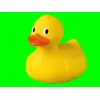 Resized (clipped)
Yellow rubber duck
Resized (clipped)
Yellow rubber duck
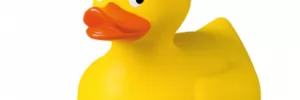 Resized (cropped)
Yellow rubber duck
Resized (cropped)
Yellow rubber duck
 Resized (scaled / distorted!)
Yellow rubber duck
Resized (scaled / distorted!)
Yellow rubber duck
4.1.3. Sample / Demo
Original image:
https://mucius.hu/pictures/2020/02/07/rubber-duck.png
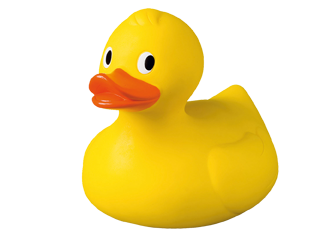 Yellow rubber duck
(This image is in the public domain.)
Yellow rubber duck
(This image is in the public domain.)
{
    "version" : "CsAB ImageStorage2 v2.0\u00df (build: 2025-06-30)",
    "success" : true,
    "error" : false,
    "response" : {
        "API_KEY" : "{api_key}",
        "user" : "{username}",
        "methode" : "create/read",
        "available_formats" : "clip_80x80_webp, [...] crop_80x80",
        "available_domains" : "mucius.hu",
        "remote_address" : "{your_ip_address}",
        "referrer" : false,
        "request" :	"/im/YOUR_API_KEY/crop_80x80_webp/https://mucius.hu/pictures/2020/02/07/rubber-duck.png?info=json",
        "request_url": "https:\/\/mucius.hu\/pictures\/2020\/02\/07\/rubber-duck.png",
        "request_format" : "webp",
        "request_size" : "80x80",
        "request_fit" : "crop",
        "original_size" : 52219,
        "load_from_cache" : false,
        "created" : 1768576683,
        "created_human" : "Fri, 16 Jan 2026 16:18:03 +0100",
        "type" : "webp",
        "mime" : "image\/webp",
        "size" : 1234,
        "percent" : 2.36,
        "width" : 80,
        "height" : 80,
        "fit" : "crop",
        "base_url" : "{SCHEME}:\/\/{HOST}\/",
        "path" : "store\/8c5dd75a8410980992c9051eaa3049ca\/1e8c5bd6\/5f0a5460\/666d4c68\/",
        "filename" : "c324801b_crop-80x80",
        "extension" : "webp",
        "url" : "{SCHEME}:\/\/{HOST}\/store\/8c5dd75a8410980992c9051eaa3049ca\/1e8c5bd6\/5f0a5460\/666d4c68\/c324801b_crop-80x80.webp"
    }
}
RESPONSE URL: /store/8c5dd75a8410980992c9051eaa3049ca/1e8c5bd6/5f0a5460/
666d4c68/c324801b_crop-80x80.webp
 Resized (cropped)
Yellow rubber duck
Resized (cropped)
Yellow rubber duck
5. Error and errormessages
5.1. JSON Errors
with an errormessage and empty response:{
"version":"CsAB ImageStorage2 v2.0\u00df",
"success":false,
"error":"ERROR #001: Invalid or missing API KEY",
"response":[]
}
5.2. Error Code on Image
for image process errors (ERROR #001: Invalid or missing API KEY):
5.3. Missing Image
if an image not found or missing:
5.4. ERROR 404 Message
if a page not found:Pfff! Error404 :: Image Storage